YOUR IDEA. YOUR FLOW. YOUR VIDEO.

AI RAP VIDEO
GENERATOR

Make a short rap video from your prompt, with generated audio. Add original lyrics, choose a style and create your first 4–15 second clip with 1 free generation.

Hotel lobby132 BPM · 720p · MP4 + AUDIO

TEMPLATES / PICK YOUR SCENE03

02 / YOUR PHOTOS0/2

The studio accepts up to 2 JPG/PNG/WebP reference photos (left and right performer), 10 MB each, sides 301–5999 pixels, ratio between 0.4 and 2.5.

PROMPT (OPTIONAL)
0/2000
Add original lyrics (optional)

Keep lyrics short enough to fit your clip. Words and timing can vary.

1 free generationNo credit cardVideo with audio

480p (fast) / 720p (default)

One generation per new verified account. Daily limits apply. Your prompt and selected photos are processed in the cloud. Save the result after it finishes.

ORIGINAL WORDS. MOVING PICTURES.2026
YOUR WORDS YOUR WORLD YOUR RHYTHM YOUR RULES

NO STUDIO. NO COMPLICATED SETUP.

How to make a rap video with AI

THREE STEPS / ONE VISION

Start with a scene, then give it a rhythm. Use the AI rap song generator studio to explore a short hook, or see what is included in the free rap video generation before making your first cut.

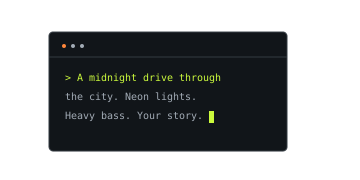
Prompt editor with a scene, mood and lighting direction 01

Put the idea into words.

Give your concept a subject, a setting and a feeling. “An original rapper on a rain-soaked rooftop at midnight” is a stronger starting point than “a cool video.” Add a camera movement, a color and a short lyrical theme. You can also bring a photo you own to explore how it looks inside a moving composition.
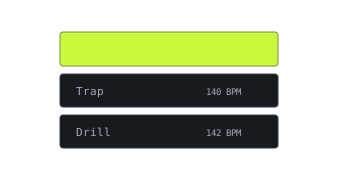
Memphis selected from a list of rap style presets 02

Find your kind of energy.

Choose a rhythm that fits the story. Memphis brings cowbell texture and a darker mood; trap leans into heavy bass and rapid hi-hats; drill favors sliding bass and syncopation. Use a preset as a starting point, then change the details. Match the pace to your idea instead of squeezing every visual influence into one prompt.

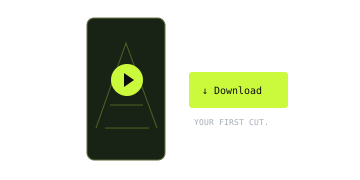
Vertical video with a download control 03

Generate. Review. Make it yours.

Choose 4–15 seconds and generate a clip with native audio. Add a short original lyric when you want a vocal delivery. Your job continues on the server, so you can return to check progress. Review the words, framing and timing, then download the MP4 and continue editing. A new verified account includes one free generation, subject to daily limits.

FIND YOUR FREQUENCY

Rap video styles you can generate

12 STYLES. ENDLESS DIRECTIONS.

Every style starts a different conversation. Pick one to load a ready-to-edit prompt into the studio. These twelve creative directions describe tempo, texture and atmosphere; they do not imitate a particular artist. The displayed BPM is a prompt target; the generated tempo can vary.

REAL GENERATED OUTPUTS

Small prompts. Real clips.

EXAMPLES / 03

These 3 clips were generated with Seedance 2.0 Mini through kie.ai. Each MP4 contains native audio and an original lyric request. Play with sound to judge the result. Words, delivery and timing can vary between generations.

4 seconds requested · 9:16

Memphis neon

A green jacket and neon rooftop give this original character a clear visual identity. The requested lyric is “Neon on the pavement, watch my city glow.” Keep one line in a four-second prompt so the voice has room to land.

8 seconds requested · 16:9

Trap rooftop

Warm sunset light and an orange jacket frame a short rooftop performance. This eight-second example demonstrates the default duration with generated audio. A longer lyric fits here, but the result should still be checked for pacing and word accuracy.

4 seconds requested · 1:1

Drill blue

A blue courtyard scene pairs an original character with the requested line “Blue light on the street, my rhythm stays unique.” The square output is 960×960 at the 720p model tier. Genre and tempo descriptions guide generation rather than certify the soundtrack.

BEFORE YOU HIT PLAY

Good questions.
Straight answers.

A few things to know about the studio, your work, and what comes next.

01

Is the rap video generator free?

Each new verified account receives 1 free generation. Choose 4–15 seconds, with 8 seconds selected by default. This is a one-time allowance. Daily account, network and service limits apply; no card is required.

02

Do I need to sign up or download an app?

Sign in with a verified account to generate and retrieve your video. Generation runs in the cloud through kie.ai. You can close the page after submission and return to see the saved job status or download a completed MP4.

03

Can I upload multiple photos for one video?

The studio accepts up to 2 JPG/PNG/WebP reference photos (left and right performer), 10 MB each, sides 301–5999 pixels, ratio between 0.4 and 2.5.

04

Can I use my video commercially?

Review the output and the rights to every ingredient before publishing or using it commercially. Use photos, lyrics, recordings and branding you own or have permission to use. Generating a clip does not grant third-party music, likeness or trademark rights.

05

Can I choose the voice of a real artist?

Describe an original delivery through energy, register and phrasing. RapVideo provides genre prompts rather than a celebrity voice selector. Use original characters and material you have permission to use, and review the result before sharing.

06

What can I download?

480p fast tier available, 720p default. Download an MP4 with generated audio at the selected model tier. Choose 9:16, 1:1, 16:9 or 21:9 framing. RapVideo adds no branded overlay to the returned file. The verified square sample is 960×960; pixel dimensions depend on framing.

KEEP THE IDEAS COMING

More AI music tools